
ClickHouse is built on the MergeTree family of engines, which power its performance and scalability. A key concept to understand in these engines is the merge process. If you’ve ever wondered why disk I/O spikes, or why storage suddenly grows after large ingests, the answer usually lies in merges.
In this article, we’ll break down:
- What is merge in ClickHouse
- How insert batch size influences merges
- How to to monitor merge activity in system logs (with real SQL examples)
What is a Merge in ClickHouse?
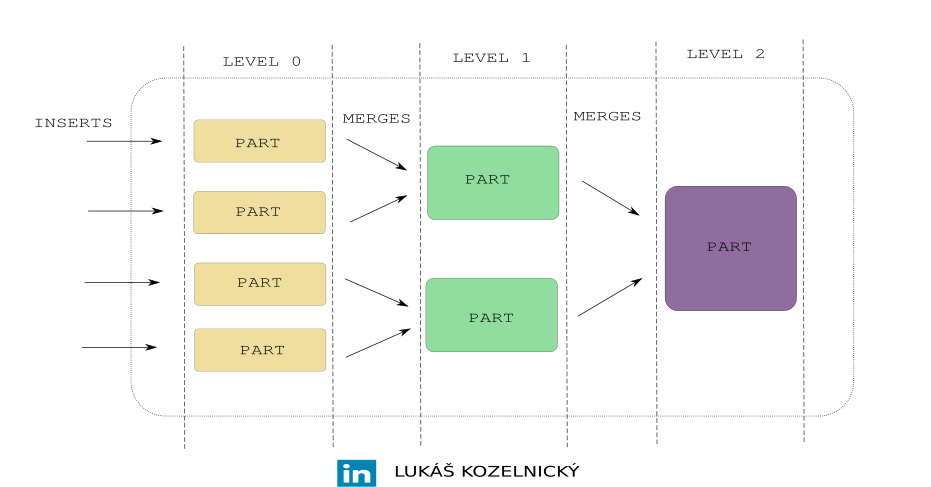
In MergeTree tables, data is stored on disk in parts. Each part is essentially a small immutable chunk of data, containing:
- Primary key index
- Column files
- Metadata
When you INSERT data into a MergeTree table, ClickHouse creates a new part on disk instead of appending data to existing parts.
Over time, if you insert data in many small batches, you’ll end up with a huge number of small parts. This has downsides:
- Too many parts that leads to dropping performance by reading many files.
- Metadata overhead increases.
- Disk usage can spike because merges generate temporary files.
That’s why ClickHouse runs background merges, which combine small parts into larger ones. That is the reason why table engine family is called MergeTree.
It is important to understand that every insert creates a new part.
Example:
CREATE TABLE events
(
    id Int64,
    timestamp DateTime,
    value String
)
ENGINE = MergeTree
ORDER BY (id, timestamp);
Now, if you run:
INSERT INTO events VALUES (1, now(), 'a');
INSERT INTO events VALUES (2, now(), 'b');
INSERT INTO events VALUES (3, now(), 'c');
By executing three inserts above you get three parts. Eventually, a background merge will consolidate them into one larger part.
Why Batch Size Matters
If you insert data in tiny batches (e.g., row by row, or very small blocks), ClickHouse will create lots of small parts, triggering frequent merges.
Example:
- Insert 10,000 rows across 10,000 single-row inserts creates 10,000 parts.
- Insert 10,000 rows in one
INSERTcreates 1 part.
In first case ClickHouse must then merge those 10,000 parts into fewer, larger ones. This burns CPU and disk I/O.
Best practice is always insert in reasonably large batches (e.g., 100k+ rows per block).
Monitoring Merges with system.part_log
ClickHouse records part activity in the system.part_log table. This system table contains one row per part operation including merges.
To see how much data has been merged/written to disk, you can run queries like:
Total bytes written by merges:
SELECT
    event_date,
    formatReadableSize(compressed_bytes) as formatted_compressed_bytes,
    sum(size_in_bytes) as compressed_bytes
FROM system.part_log
WHERE event_type = 'MergeParts'
GROUP BY event_date
ORDER BY event_date DESC;
Number of merges per day:
SELECT
    event_date,
    count() AS merges
FROM system.part_log
WHERE event_type = 'MergeParts'
GROUP BY event_date
ORDER BY event_date DESC;
Largest merges by size:
SELECT
    table,
    database,
    partition_id,
    duration_ms / 1000 as duration_sec,
    formatReadableSize(size_in_bytes) as part_size,
    part_name
FROM system.part_log
WHERE event_type = 'MergeParts'
ORDER BY size_in_bytes DESC
LIMIT 10;
Key Takeaways
- Every insert produce new part. Merges are required to combine small parts into larger ones.
- Batch inserts reduce merge overhead. Aim for bigger blocks to avoid thousands of tiny parts.
- Monitor merge activity with
system.part_logtable. You can see exactly how much data is rewritten and how expensive merges are.
By understanding merges, you can tune your ingestion patterns, reduce disk I/O, and keep ClickHouse running smooth.